
HRMLESS Account Onboarding
Setting up HRMLESS for the first time. About ten minutes.
1. Create your login
Go to the HRMLESS home page and click "login" in the top right corner, or use this direct link
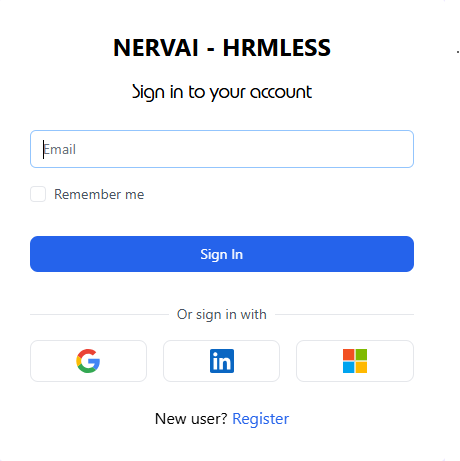
One on the login page you have a few options to register.
- Sign in with Google
- Sign in with LinkedIn
- Sign in with Microsoft
- or Register
All 4 will create your account for authenticating. We recommend using an auth provider, instead of manually creating an account because it will save you from having to create another email and password to remember, and also save you from having to do the "verify your email" step.
If you choose "Register", you will be asked to enter:
- First Name
- Last Name
- Password
Afterwards, you will be asked to verify your email address. An email should arrive in your inbox within a minute or two. If it is missing, please check your junk mail.
if our emails arrive in your junk mail, please mark it as safe/trusted and move it to your inbox. This helps out our domain reputation and helps future users by increasing the likelihood it will land in their inbox over their junk mail box.
2. Add your company details
The first time you sign in, HRMLESS asks who you are.

Organization Name, Phone Number, Address Line 1, City, State and Postal Code are required — they are the ones marked with a star. Country defaults to US.
Your contact name and phone number appear in the messages your candidates receive, so use the ones you want applicants to see.
Enrollment Code is optional. Leave it blank unless a HRMLESS Account Executive gave you one to use.
Tick I consent to the Terms and Conditions, then choose Continue to Plans.
3. Pick a plan and add payment
Select a Plan, then continue to checkout.
You will be redirect to Stripe to enter your card information and complete the subscription.
Once that is completed you will be redirected back to the HRMLESS platform.
Finish this in one go. If you close the page part-way through, your account is created but has no plan attached, and you will have to reach out to HRMLESS support to have your account and payment synced properly.
4. Find your way around
Everything is in the menu down the left.

| Menu item | What it is |
|---|---|
| Candidates | Everyone who has applied, and where they are up to |
| Positions | The roles you are hiring for |
| Organization | Your company details, messages and billing |
| Analytics | How your hiring is going |
| Integration | Connect your ATS |
| Archive | Candidates you have put aside |